Today we discuss how the marketing team at enCloud9 identified a problem caused by data silos, planned a solution that could resolve the difficulty, and worked with the development team at enCloud9 to build out that solution. We created a custom Dynamics 365 Content Management Solution, and it has had amazing impact on the team's ability to create and publish content for our web audience across multiple channels. At enCloud9, we solved this exact problem by creating our own centralized system—and we use it every day to run our content strategy.
Watch the Video
Don’t have time to read? Watch our walkthrough of the custom Dynamics 365 Content Management Solution we built.
Why Dynamics 365 Content Management Matters
Content silos make it difficult to manage, track, and align your marketing strategy. By centralizing content with a Dynamics 365 Content Management Solution, you can:
✅ Organize blogs, videos, newsletters, and landing pages in one place
✅ Track who owns what content and where it fits in your funnel
✅ Improve planning, updates, and internal collaboration
✅ Create a calendar-based view of your marketing output
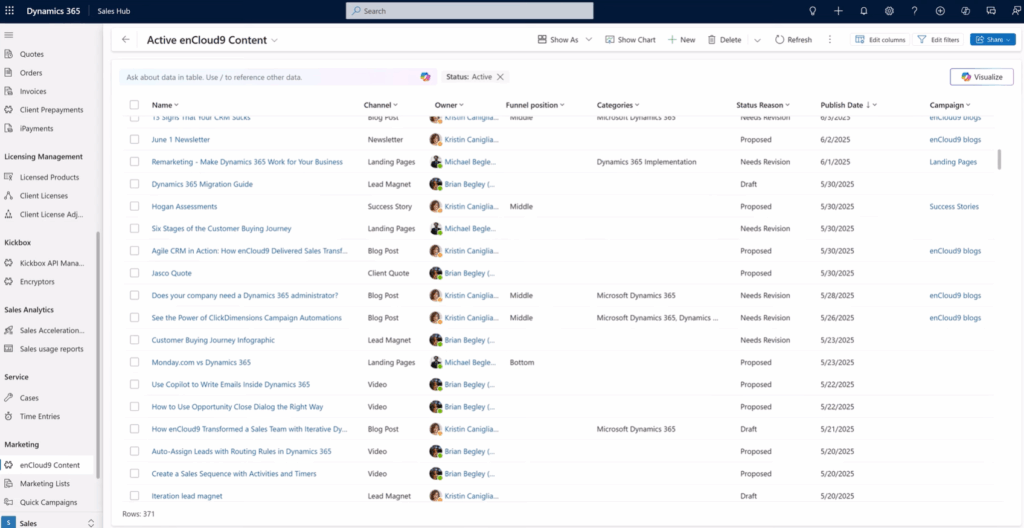
Real-life example: At enCloud9, we replaced spreadsheets and scattered folders with a single table in Dynamics 365. Now we manage over 370 content pieces with ease with our Dynamics Content Management Solution.
How We Built our Dynamics 365 Content Management Solution
We created a custom table called enCloud9 Content in Dynamics 365. This table was built using tools available in the - giving us flexibility to tailor it to our needs.
Each content item includes:
Title, type (blog, video, etc.), and owner
Sales funnel stage and campaign associations
Publish status and dates
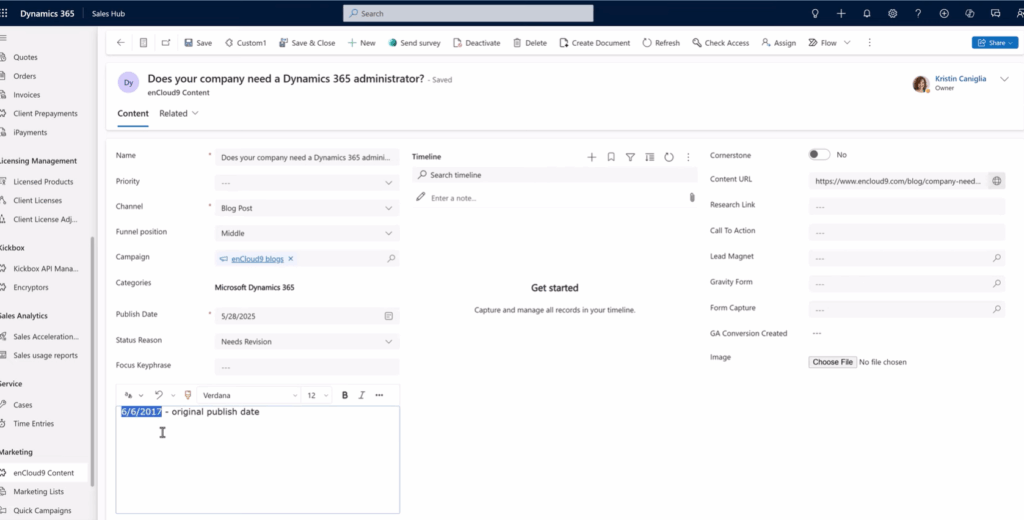
Notes, URLs, and research links
This allows us to track content from idea to publishing—and everything in between
Use Case: Updating an Old Blog
We reviewed a 2017 blog, "Does your company need a Dynamics 365 Administrator?", marked it as outdated, and assigned it for revision. From research notes to publishing, the entire process stayed visible and trackable.
Visualize Work with Custom Views
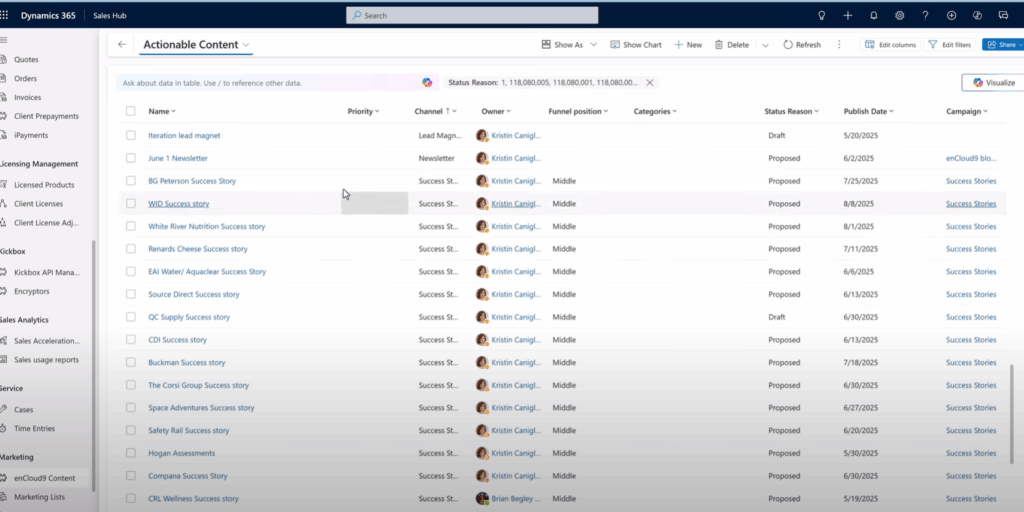
Two views we rely on:
Actionable Content View – shows all in-progress items across the team
Calendar View – provides a visual content schedule for the current and upcoming months
Our Dynamics 365 Content Management Solution helps us stay organized and aligned.
The Results: More Organized, Efficient Content Planning
✅ Fewer silos and lost documents
✅ Easier content updates and repurposing
✅ Unified marketing collaboration
✅ Better visibility across your marketing funnel
Real-life example: We now know exactly what content is publishing each week and can plan smarter based on campaign needs. Would you like to see how we’ve helped others? Check out our
Phase 2 - What comes next
As most Dynamics 365 custom development projects progress, removing data silos brings up new ideas and improvements to the original concepts. We are already drawing up plans for . Some of the next steps on the drawing board include:
Building in status notification alerts using Power Automation.
Linking specific content to leads when identifiable to report on revenue by content
Creation of web traffic reports through integration with Google Analytics and PowerBI
Integration with CoPilot for content recommendations.
Let enCloud9 Help You Build a Smarter Dynamics 365 System
At , we specialize in helping businesses maximize the value of their Dynamics 365 investment. Whether you're overwhelmed by scattered content or looking to scale a business strategy, our team can design a fully custom system tailored to your unique goals.
With a custom application, you'll eliminate silos, enhance team collaboration, improve planning, and gain real-time visibility into your efforts—all from within your CRM.
???? Ready to transform the way you manage content? or explore our to get started.
For more ways to streamline sales and marketing, check out some of our other recent posts on:


I like the positivity in your writing, it makes the topic very engaging